Software Search
HELP/FAQs?

Got questions/problems? Take a look through our FAQs (frequently asked questions), or email us at: support@bigyellowkey.com. We shall do our best to get back to you promptly.

Want Discounts?

Are your prices for multiple domains too large? Are you trying to get licences for test domains but being asked to pay full cost? Don't worry; we can add test domains to your licences manually. Just purchase a single domain addon/upgrade for what it is that you need, and then email us about your situation regarding the remaining domains and we'll liaise with you over the options. email us at: support@bigyellowkey.com. We shall do our best to get back to you promptly. click here for more information regarding multiple domains, upgrades, and discount policies.

BigYellowKey News
(click here to view all BYK news)

Released: 7/30/2011 11:50:00 PM
We've now got 4 maillists you can signup to, eg "My BYZ Updates" for personalized upgrade info on your products so that you get informed as soon as a new version of *your products* come out. click here for more info.

Released: 4/12/2011 6:00:00 AM
Twitter: You can now keep up with BigYellowKey developments/news using twitter: http://twitter.com/bigyellowkey If you're a Twitter user, Click the "Follow" link on http://twitter.com/bigyellowkey to keep up to date.

Released: 4/9/2011 2:05:00 PM
Do you sell website tools/applications? We are currently looking for developers and software vendors to help beta-test the new system. Want to sell your own stuff via this site? Contact us and beta-test the system and see what you think.

Released: 3/26/2011 2:05:00 PM
Our software has now been categorized on the right-panel of the site, so you can get a quick/easy overview of what's available.

Released: 3/10/2010 2:05:00 PM
Twitter: You can now keep up with BigYellowZone releases and news using twitter: http://twitter.com/bigyellowzone If you're a Twitter user, Click the "Follow" link on http://twitter.com/bigyellowzone to keep up to date.

Released: 12/14/2009 2:45:00 PM
VPASP V7 status for BigYellowZone Addons:
click here for details

Released: 8/25/2009 2:05:00 PM
We've decided to extend the discounting of the BYZ subscription services, where the initial fee element is reduced by the cost of BYZ Addons that you've purchased in the last 12 months. This relates to the subscription services of BYZ147, BYZ148, and BYZ149. The reduced price will be shown when you get to the confirm-order page (ie after you have entered your domain).

Released: 4/25/2009 10:45:00 AM
BYZ Subscription Services added! You can now subscribe to get addons, or hosting, or both. For people who have bought BYZ addons in the last 12 months, you can trade-in what you've spent on addons in the last 12 months against a reduction in the relevant initial-fee element of the subscription service. This trade-in offer will only last for the next 30 days, so trade-in now! This trade-in relates to BYZ147, BYZ148, and BYZ149. See "subscription services" in the right-panel above or click on "services list" at the top. You'll get/see your discounted price of the subscription when you get to the final "confirm order" page (ie before you make payment, but after you've chosen your domain(s)). For example, if you've spent £120 on BYZ addons in the last 12 months, then you can get BYZ147 for just £37. If you've spent £200 on BYZ addons in the last 12 months then BYZ147 would only cost you £7. The prices concerned relate to prices excluding vat/tax and do not include installation cover/services. PLEASE NOTE: If you already have BYZ072/02 (Installation Cover) then that installation cover becomes invalid after you subscribe.

Released: 4/14/2009 2:00:05 PM
The My-Software screen has been changed to show a traffic-light system which shows a red cross for any modules which need upgrading, and a green tick for any modules which are up to date, which allows you to see at a glance if you need upgrades. NOTE: Please check your my-software screen regularly to see if upgrades are available.

Released: 4/14/2009 2:00:00 PM
Upgrade protection has been added which you can optionally purchase whenever you buy new modules, domains, or upgrade. It will give you permanent cover against the cost of future software upgrades for your module/domain. This is a major change to the bigyellowkey.com system; please let us know if you have any problems/questions.

Released: 2/23/2009 11:05:00 PM
**Notice: There was a temporary glitch with the bigyellowkey.com checkout process today; we have now investigated/fixed the problem. Apologies for any inconvenience this may have caused.

Released: 12/1/2008 12:00:01 AM
VAT Reduced to 15% - Following the recent government announcements in the UK, VAT (only payable on orders placed from the EU) has now been reduced from 17.5% to 15% with immediate effect from Midnight 1st December 2008, and will remain at 15% for 13 months. All of the bigyellowkey.com ordering and payment processes have been changed to accommodate this. Customers outside the EU do not pay any VAT. Customers from the UK always pay VAT. Customers from the EU (but outside the UK) who have a valid VAT/Tax number do not pay vat. Customers from the EU (but outside the UK) who do not have a valid VAT/Tax number pay VAT.

Released: 11/10/2008 1:05:00 PM
FAQs (Frequently Asked Questions) section has been added. Click on the Help link at the top of the page, or click on the FAQs link on the right panel help section.

Released: 10/17/2008 5:05:00 PM
What's New Link added to the top of the BYK screens. This allows you to see all new software released, and all new versions (upgrades) released, in descending date order. Want to know what's been happening on the software front? Just click on "what's new?" at the top of the screen.

Released: 9/2/2008 6:00:00 PM
New Software Vendor! SQLInjectionScanner.com (a sister company of BigYellowZone) is now using the BigYellowKey.com site to distribute anti-hacker tools and other products/services which site owners will find very useful. Visit SQLInjectionScanner.com for more info. If you previously bought the BYZ "hack checker", then check your my-software screen to grab the latest update; it has now become the "SQLInjectionScanner.com Scanner" and the new version has lots more features. A data cleaner is also available, as are check/fix services.

Released: 11/22/2007 4:29:00 PM
Mail-Lists (with discounts) added. Your profile now has a mail-list option at the bottom where you can optionally sign up to mail-lists. Some mail-lists will give you discounts (these discounts will be explained on the mail-list description). Default will always be "no sign up" for any customer, either historic or new customers. You will need to explicitly tick the sign-up box and save the changes to get added to the mail-list (and receive the relevant discount).

Released: 10/16/2007 11:57:00 AM
Live/Archived radio buttons fixed - the live/archived/all radio buttons at the top of your "My Software" (and other "My") screens have now been fixed. They were previously one-step behind what you pressed, but are now correct and automatically refresh as soon as you click on one of the radio buttons.

Released: 10/16/2007 11:56:00 AM
localhost assigned for free - you can now add localhost to any of your licenses during purchases/upgrades, or via your "My Domains" tab, and it will automatically give you the localhost key for free.

Released: 10/16/2007 11:55:00 AM
New version of byk released - if your customer control panel shows you the login screen, then please login again. Once logged in you will no longer need to login again.

Released: 10/11/2007 12:30:00 PM
Upgrade fix applied. There was a problem when upgrading Backfilled BYZ licences, this has now been fixed, but if you upgraded on BYK prior to this news item being added then go into your "My Software" screen, and check if you have multiple versions of a given product for a given domain; if you have multiple versions then press the archive link on the old versions, then go to your license keys page and create a new license key file, then download that key file and upload it to your site.

Released: 10/8/2007 11:50:00 PM
Sub-Modules added to your software lists - We have now ensured that all of your sub-modules are now listed for your main modules on your software screen. This means that you can now upgrade/download either the main module, and/or the sub-modules. Our upgrading and purchasing procedures use "intelligent" bundling, whereby if you've upgraded/bought all the corresponding sub-modules then you'd automatically also be assigned all appropriate parent bundls, and if you buy/upgrade a bundle then it will automatically assign access to all the sub-modules as well. Checkout your "My Software" screen, as it may now be showing you additional/new sub-modules.

Released: 9/28/2007 8:15:00 AM
BYZ Interface Improved - We have now changed our sister site (bigyellowzone.com) so that you will only get directed to bigyellowkey when you checkout, and not each time you add an item to your cart. This means that you can continue freely shopping/browsing on bigyellowzone.com without having to jump between byk/byz sites for each item. Note that for upgrades you should always use bigyellowkey.com for browsing/purchasing, and not bigyellowzone.com.

Released: 9/25/2007 11:45:00 PM
Version History Displays - We've added a link on the product-codes on your "My Software" screen which will popup a printer-friendly page that displays all the product details and the full version history (ie all the release notes of all versions) so that you can now see if you want/need to upgrade specific modules.

Released: 9/23/2007 2:05:00 PM
We're Live ! - BigYellowKey.com has now become a live system. There might be some teething questions/problems following its release, so if you have any questions/problems then please do let us know.

MultiBuy Discounts for VPASP - BYZ168

<< back to previous screen

MultiBuy Discounts for VPASP, buy-1-get-1-free, 3-for-2 etc - create discount shelves with different options and put whatever products you want on them.


Compatibility, Bundling, and Status Notes:
Compatible with VPASP V4.5 to V7.
Before installing, you must have installed:
BYZ038
BYZ036

This product includes:
BYZ038
BYZ036
Latest version:01/21-DEC-2010
From vendor:Big Yellow Zone
Price:£35.00
add to cart

MultiBuy discounts all relate to Quantity-Related discounts.

Example uses:
  • Buy 1, Get One Free (equates to 2-for-1)
  • 3-for-2 (equates to buy-3-get-1-free)
  • Buy 3, Get 1 half-price
  • Buy 5, get 2 free (equates to 5-for-3)
  • Buy 10, get 30% discount on 5


This is intended for special offers where you have multiple products that are part of an offer, where those products can be "counted" in any combination (ie it doesn't matter which of the products you grab off that "discount shelf", each product is counted as an item that's part of the offer).

eg for a buy-1-get-1-free, you can buy any 2 items from the discount shelf (the same item, or different items) and the cheapest one will automatically be free.

Demo Links:
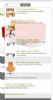
To see it in action, click here for a 3-for-2 offer on vpaspv6.5 or click here for a buy-1-get-1-free offer on vpaspv7
(both these sample sites have all products flagged as being on the "discount shelf", so play around with adding different items to your cart and seeing the mini-cart total and the view-cart page etc)

More Info on "Discount Shelves"
The easiest way to explain how these discounts work is to think of your online store as having physical shelves with products on them, where a given shelf has a given discount offer and where there's a selection of your products on each shelf.

eg you might have a "Buy-1-Get-1-Free" shelf, and a "3-for-2" shelf. You can have more than one shelf displayed/active at the same time. You can have a given product on more than one shelf at the same time (eg a product can be part of a buy-1-get-1-free offer as well as being available for a 5-for-3 offer).

The processing of the MultiBuy discounts will never apply more than one multi-buy discount to a given quantity-unit/item in the cart; it will always pick the most appropriate offer for the item (if more than one offer is relevant to it) and apply that discount.

The discount is displayed at order-level (ie at the bottom of the cart, added to the discount total), and it's also taken into account when the mini-cart total is shown in your header/trailer.

The processing/calculation will go through your mini-cart, work out which quantity-units/items are discounted, calculate what the discount is, and then will display the total discounted amount at the bottom.

ie it works in the same way as it would in a physical store, where the item-lines do NOT show the multi-buy discounted prices, but at the bottom of the receipt you see the amount that's been discounted in total due to the offers (and where you see the discounted total as the total in your minicart)

The items that get discounted will always be the cheapest ones in the cart which relate to that offer. For example, if you have a 3-for-2 offer and you have 2 items in the cart which have a normal price of $100 each, and you have 1 item in the cart which has a normal price of $150, then the logic will automatically apply the discount to one of the $100 products. ie the customer will be charged a total of $250 - the full price for the $150 item, full price for one of the $100 items, and the remaining $100 item will be set to free.


Technical/Developer Information:
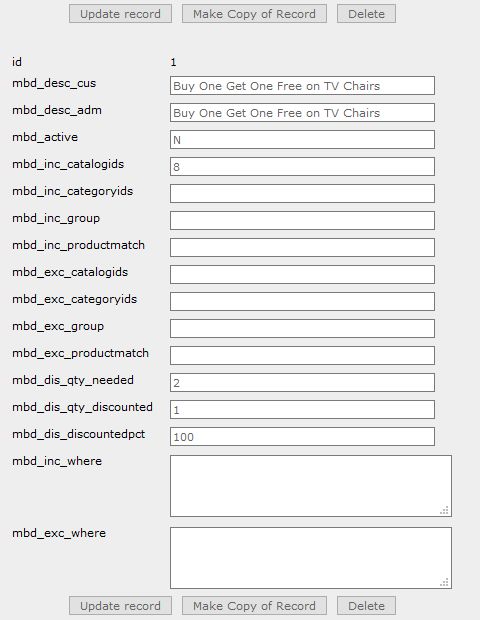
To setup a "shelf" (ie to create a discount offer and define which products are on that shelf), you simply create a new record on the mbd_multibuydiscounts table (the MultiBuy Discounts admin menu item that you add during installation is how to access this table/data).

Each mbd_multibuydiscounts record relates to one "shelf" - remember that a product can be on more than one shelf, and there can be as many shelves as you want, and each shelf can have any discount rule that you want.

The mbd_multibuydiscounts record is NOT a manually-entered matrix of discounts/products data, it's much more flexible and easier to use; the discount record specifies search criteria for which products are on the shelf, and specifies optional additional exclusion criteria for what you want to take off the shelf, and holds the qty-needed and the qty-discounted and the discount-pct values for the offer/shelf.

For example, you can specify something like:
this offer relates to all products that are in categoryids 1,2,3, or 4, but it doesn't apply to products which have a code that starts with "A".

For the inclusion and exclusion criteria, you can use categoryid lists, catalogid lists, productmatch lists, group-for-discount lists, or you own where clause where you can specify anything you want.


For further information from the vendor about this product, please visit:


Full Version History:
VerNo Version Date Release Notes
01 21-DEC-2010 Initial version - Big Yellow Zone MultiBuy Discounts for VP-ASP