 | | | Latest version: | | 14/01-APR-2015 | | From vendor: | | Big Yellow Zone | For Terms and Conditions, click here
Please do not purchase any BigYellowZone
products/services or request technical
support until you have read and agree with
the terms and conditions. | | Price: | | £25.00 | | add to cart |
| Compatibility, Bundling, and Status Notes: | Compatible with VPCart V4.5 to V8
Before installing, you must have installed:
BYZ038
BYZ036
This product includes:
BYZ038
BYZ036 |
|
Redirection is done via 301 (search engine friendly) redirects, and will avoid memory leaks by automatically trying to close the database connection (if it's open already) on VPCart V7/V8 before the redirection is executed.
Here are some of the applications/options that you can use it for:
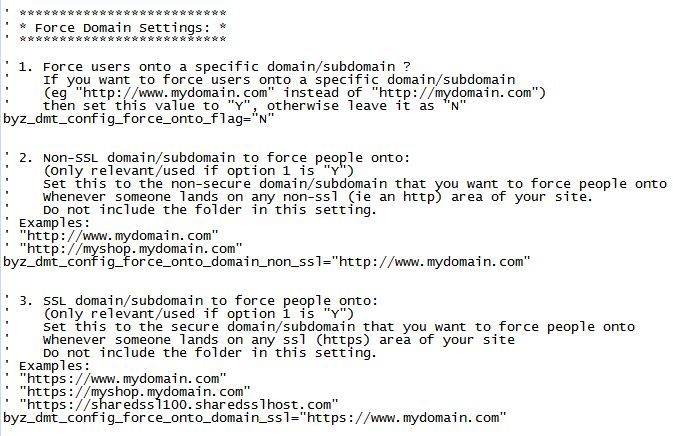
1. Direct visitors onto a specific domain
If someone lands on one of your domain aliases, or lands on
"http://mydomain.com" instead of "http://www.mydomain.com" then you can
setup the config options to automatically transfer them to the relevant
domain on the same page that they were originally trying to view.
2. Avoid Duplicate (Incorrectly Mapped) Home Pages
Your home page (eg "http://www.mydomain.com/default.asp") is seen as a different page than your domain root url (eg "http://www.mydomain.com/") by search engines, even though it loads the same asp file.
This means that if someone lands on "http://mydomain.com/" (ie non-www) and your server/IIS redirects you to "http://www.mydomain.com/default.asp" then Google will see these as 2 different pages, and it will think that your non-www domain is not being mapped correctly to your www domain. This can lead to Google giving you a lower ranking or even penalising you for duplicate content.
BYZ044 avoids this problem as when someone lands on the incorrect domain while on a folder "home" page, it will redirect them to the folder rather than the default.asp url.
3. Direct visitors on/off your SSL (https) area for specified pages
There's a config option which holds the list of which pages you want to
use SSL for; whenever one of those pages is being viewed the addon will
automatically redirect the user to the corresponding SSL area (if
they're not on it already) for that page, and it'll automatically
transfer them back
off the SSL area when they land on a non-ssl-listed page. This means
that you don't need to change any of the links on your site (either
ones you've created in your header/trailer files, or links which are
created by vpasp functions) to point to your SSL area as the system
will automatically transfer the user when appropriate.
4. Avoid "posting to non-secure page" browser warnings
If your site visitor is on an ssl page, and they execute a search (eg from the top/side panel keyword search mini-form) from that ssl page, then the domain tool will be able to deal with moving them off ssl automatically on the results page while still retaining their search option/keyword and also without getting a "you're posting from a secure page to a non-secure page" browser warning.
5. Set your gateway return URL correctly
Use the BYZ_DMT_CURRENT_DOMAIN function in your gateway config
file to ensure that the return url is set to the same domain that the
user was originally on so that when they return their session is still
active.
All of the above are fully configurable/optional, and if using them
you can help to dramatically reduce the number of dropped carts that
your site gets.
"Why are these relevant/needed?" you may ask. Here's why:
The domain "http://mydomain.com" is seen as an entirely different
domain to "http://www.mydomain.com" as far as your server/host is
concerned, so if people land on one of those domains and then the cart
later moves them to the other area (eg via your gateway or from your own links) then the user
will lose all their session info. This problem leads to lots of dropped
carts, because some people just type in "mydomain.com" into their url
line, whereas other people will use "www.mydomain.com". It also leads to Google seeing your site as having duplicate pages which can significantly lower your ranking. This is why
this addon is useful for people who have just one domain as well as for
people who use domain aliases.
|
Technical/Developer Information:
You can also use these functions in your asp code:
1. BYZ_DMT_CURRENT_DOMAIN()
This will return the full domain (including the protocol) that is currently being viewed.
Example call:
<% Response.Write "I am currently
on: "&BYZ_DMT_CURRENT_DOMAIN() %>
Would return values like this:
I am currently on: http://www.mydomain.com
I am currently on: http://mysubdomain.mydomain.com
This might be useful in something like your gateway config file so that you can set your return url to the same domain that the user originally landed on.
2. BYZ_DMT_CURRENT_DOMAIN_NO_PROTOCOLS()
This will return the main domain (not including the protocol) that is currently being viewed.
Example call:
<%
Response.Write "I am currently on: "&BYZ_DMT_CURRENT_DOMAIN_NO_PROTOCOLS()
%>
Would return values like this:
I am currently on: mydomain.com
I am currently on: mysubdomain.mydomain.com
This might be useful if you want to check which domain people are on and show different headers for different domains etc.
3. BYZ_DMT_CURRENT_FULLURL()
This will return the full url, including the protocol and arguments for the page that is currently being viewed.
Example call:
<%
Response.Write "I am currently on: "&BYZ_DMT_CURRENT_FULLURL() %>
Would return values like this:
I am currently on: http://www.mydomain.com/shopexd.asp?id=100
I am currently on: http://mysubdomain.mydomain.com/shopexd.asp?id=100
This might be useful if you want to hold the current full url in a variable so that you can return to it later.
4. BYZ_DMT_CURRENT_FILEBEINGVIEWED()
This will return the page name that is currently being viewed, not including the protocol, arguments, or relative directory (ie just the actual asp filename)
Example call:
<% Response.Write "I am currently
on: "&BYZ_DMT_CURRENT_FILEBEINGVIEWED() %>
Would return values like this:
I am currently on: shopexd.asp
I am currently on: Default.asp
Useful if you want to display certain elements for certain pages. For example, you could change your header file to only show a
certain graphic while on a certain page. Note that this function is
case-sensitive; it shows the filename in the same case that the user is browsing on their browser address line.
5. BYZ_DMT_CURRENT_FILEBEINGVIEWED_LOWERCASE()
This will return the page name that is currently being viewed, not including the protocol, arguments, or relative directory (ie just the actual asp filename)
Example call:
<% Response.Write "I am currently
on: "&BYZ_DMT_CURRENT_FILEBEINGVIEWED_LOWERCASE() %>
Would return values like this:
I am currently on: shopexd.asp
I am currently on: default.asp
Useful if you want to display certain elements for certain pages. For example, you could change your header file to
only show a certain graphic while on a certain page. Note that this function is not case-sensitive; it shows the filename in lower case always.
6. BYZ_DMT_IS_THIS_FILE_BEING_VIEWED(arg_in_filename)
This will return "Y" or "N" depending on whether or not the file which is passed across as "arg_in_filename" is currently being viewed. Note that this always forces lower case, so if using it you should always pass across the filename argument in lower case. Also, you should not supply the relative path or protocol or domain, you should only pass across the asp file name.
Example call:
<% Response.Write "Am I on
default.asp?: "&BYZ_DMT_IS_THIS_FILE_BEING_VIEWED("default.asp") %>
Would return values like this:
Am I on default.asp?: Y
Am I on default.asp?: N
Useful if you want to display certain elements for certain pages. For example, you could change your header file to only show a certain graphic while on a certain page. |
| Terms and Conditions: | For terms, conditions, and licensing information for all BigYellowZone products/services, please click here.
Please do not purchase any BigYellowZone products/services or request technical support until you have read and agree with the terms and conditions. |
Full Version History:
|
VerNo
|
Version Date
|
Release Notes
|
|
01
|
04-OCT-2004
|
Initial version - Big Yellow Zone Domain Tools For VP-ASP. |
|
02
|
17-NOV-2005
|
Various extra functions/tools added to return files being run etc. |
|
03
|
24-FEB-2006
|
Changed to be more generic and packaged up for sale as an addon. (This is the first publicly available version of this addon) |
|
04
|
31-MAY-2007
|
Upgraded BYZ038 (Licensing) module to cater for VP-ASP V6.5.
Effected files:
byz044_install.asp (changed file)
README.htm (changed file) |
|
05
|
05-OCT-2008
|
Upgraded BYZ038 from V07 to V09.
Upgraded BYZ036 from V02 to V04.
Effected files:
byz044_install.asp (deleted file)
README.htm (changed file) |
|
06
|
27-NOV-2008
|
Enhanced to cater for shared ssl which has a different directory compared to the corresponding non-ssl area.
Changed to ignore case for domain redirection checking.
Changed, commented, and rearranged configuration settings.
Added more help notes and tips to the readme file.
Effected files:
README.htm (changed file)
byz_domaintools_$config.asp (changed file)
byz_domaintools_inc.asp (changed file) |
|
07
|
12-DEC-2008
|
Enhanced to cater for sub-domains redirecting to/from main domains with differing folders (in a similar way to how additional folders on shared ssl is dealt with).
Effected files:
README.htm (changed file)
byz_domaintools_$config.asp (changed file)
byz_domaintools_inc.asp (changed file)
byz_domaintools_system.asp (changed file) |
|
08
|
26-FEB-2010
|
Changed installation notes and program files to cater for VPASP V7.
Added more files to the default SSL page list (for VPASP V7+ only).
Upgraded BYZ038 (from V09 to V12)
Upgraded BYZ036 (from V04 to V07)
Note: If upgrading BYZ044 from a previous version on VPASP 6.5 or below, please note that you need to now have includes for the byz_domaintools_vars_inc.asp file and for the byz_domaintools_inc.asp file, so these includes have been moved (no longer in shop$db.asp) and there are now 2 of them instead of just 1 - see installation notes for more details.
Effected files:
README*.htm (changed files)
byz$044_version.asp (new file for all vpasp versions)
byz_domaintools_$config.asp (changed file for vpasp v7+ only)
byz_domaintools_inc.asp (changed file for all vpasp versions)
byz_domaintools_vars_inc.asp (new file for all vpasp versions) |
|
09
|
06-FEB-2011
|
Changed redirection to use 301 (search engine friendly) redirection (all versions).
Split out the redirection execution into a separate file (all versions).
Added database closing to avoid memory leaks (for vpaspv7 only).
Effected files:
README*.htm (changed files)
byz$044_version.asp (changed file for all vpasp versions)
byz_domaintools_inc.asp (changed file for all vpasp versions)
byz_domaintools_redirect.asp (new file for all vpasp versions)
byz_domaintools_system.asp (changed file for all vpasp versions) |
|
10
|
12-MAR-2012
|
Added extra config options and logic to redirect to / instead of /default.asp when users land on a folder home page. This avoids search engines from seeing your non-www domain home page as a different page to your www home page and avoids potential duplicate-page errors/problems on Google etc.
Created new library function (BYZ_DMT_IS_THIS_SSL() which always returns Y or N).
Changed to use the new BYZ038 functions where appropriate.
Upgraded BYZ038 (from V12 to V16)
Upgraded BYZ036 (from V07 to V11)
Please Note: You must be using V16 or later of BYZ038 before upgrading to V10 or later of BYZ044.
BYZ044 V10 or later will not work with V15 or below of BYZ038.
Effected files:
README*.htm (changed files)
vpaspv65andbelow/byz$044_version.asp (file changed)
vpaspv65andbelow/byz_domaintools_$config.asp (file changed)
vpaspv65andbelow/byz_domaintools_inc.asp (file changed)
vpaspv65andbelow/byz_domaintools_redirect.asp (file changed)
vpaspv65andbelow/byz_domaintools_vars_inc.asp (file changed)
vpaspv7andabove/byz$044_version.asp (file changed)
vpaspv7andabove/byz_domaintools_$config.asp (file changed)
vpaspv7andabove/byz_domaintools_inc.asp (file changed)
vpaspv7andabove/byz_domaintools_redirect.asp (file changed)
vpaspv7andabove/byz_domaintools_vars_inc.asp (file changed) |
|
11
|
07-JUL-2012
|
Upgraded BYZ038 (from V16 to V17)
Upgraded BYZ036 (from V11 to V12)
Please Note: You must be using V16 or later of BYZ038 before upgrading to V10 or later of BYZ044.
BYZ044 V10 or later will not work with V15 or below of BYZ038.
Effected files:
README*.htm (changed files)
vpaspv65andbelow/byz$044_version.asp (file changed)
vpaspv7andabove/byz$044_version.asp (file changed) |
|
12
|
17-JUL-2012
|
Upgraded BYZ038 (from V17 to V18)
Upgraded BYZ036 (from V12 to V13)
Please Note: You must be using V16 or later of BYZ038 before upgrading to V10 or later of BYZ044.
BYZ044 V10 or later will not work with V15 or below of BYZ038.
Effected files:
README*.htm (changed files)
vpaspv65andbelow/byz$044_version.asp (file changed)
vpaspv7andabove/byz$044_version.asp (file changed) |
|
13
|
04-SEP-2013
|
Added an extra config option for a list of ignore files when forcing a move between ssl and non-ssl so that some pages (eg ajax-postings from side panels such as a predictive-search popup) can be done on ssl and/or non-ssl without redirection while other pages still redirect as appropriate.
Added extra logic so that when the url is redirected, it also takes with it the relevant form fields (eg for when posting from a search box on a side panel from an ssl page), and added extra config options as a fail-safe to ensure that secure info (eg userid/pwd etc) never gets its form details added to the querystring.
Added more pages to the default ssl page-list config option.
Added live version/upgrade checks to the documentation documents.
Upgraded BYZ038 (from V18 to V27)
Upgraded BYZ036 (from V13 to V16)
Please Note: You must be using V27 or later of BYZ038 before upgrading to V13 or later of BYZ044.
BYZ044 V13 or later will not work with V26 or below of BYZ038.
Effected files:
README*.htm (changed files)
vpaspv65andbelow/byz$044_version.asp (changed file)
vpaspv65andbelow/byz_domaintools_$config.asp (changed file)
vpaspv65andbelow/byz_domaintools_inc.asp (changed file)
vpaspv65andbelow/byz_domaintools_redirect.asp (changed file)
vpaspv65andbelow/byz_domaintools_vars_inc.asp (changed file)
vpaspv7andabove/byz$044_version.asp (changed file)
vpaspv7andabove/byz_domaintools_$config.asp (changed file)
vpaspv7andabove/byz_domaintools_inc.asp (changed file)
vpaspv7andabove/byz_domaintools_redirect.asp (changed file)
vpaspv7andabove/byz_domaintools_vars_inc.asp (changed file) |
|
14
|
01-APR-2015
|
Upgraded BYZ038 (from V27 to V31)
Upgraded BYZ036 (from V16 to V18)
Enhanced/changed to cater for VPCart V8.
Changed instances of VP-ASP/VPASP to VPCart as VPASP has now been rebranded/renamed.
Effected files:
README* (changed files)
vpcartv65andbelow/byz$044_version.asp (changed file)
vpcartv65andbelow/byz_domaintools_$config.asp (changed file)
vpcartv65andbelow/byz_domaintools_redirect.asp (changed file)
vpcartv7/byz$044_version.asp (changed file)
vpcartv7/byz_domaintools_$config.asp (changed file)
vpcartv7/byz_domaintools_redirect.asp (changed file)
vpcartv8andabove* (new folders/files) |
|