Software Search
HELP/FAQs?

Got questions/problems? Take a look through our FAQs (frequently asked questions), or email us at: support@bigyellowkey.com. We shall do our best to get back to you promptly.

Want Discounts?

Are your prices for multiple domains too large? Are you trying to get licences for test domains but being asked to pay full cost? Don't worry; we can add test domains to your licences manually. Just purchase a single domain addon/upgrade for what it is that you need, and then email us about your situation regarding the remaining domains and we'll liaise with you over the options. email us at: support@bigyellowkey.com. We shall do our best to get back to you promptly. click here for more information regarding multiple domains, upgrades, and discount policies.

BigYellowKey News
(click here to view all BYK news)

Released: 7/30/2011 11:50:00 PM
We've now got 4 maillists you can signup to, eg "My BYZ Updates" for personalized upgrade info on your products so that you get informed as soon as a new version of *your products* come out. click here for more info.

Released: 4/12/2011 6:00:00 AM
Twitter: You can now keep up with BigYellowKey developments/news using twitter: http://twitter.com/bigyellowkey If you're a Twitter user, Click the "Follow" link on http://twitter.com/bigyellowkey to keep up to date.

Released: 4/9/2011 2:05:00 PM
Do you sell website tools/applications? We are currently looking for developers and software vendors to help beta-test the new system. Want to sell your own stuff via this site? Contact us and beta-test the system and see what you think.

Released: 3/26/2011 2:05:00 PM
Our software has now been categorized on the right-panel of the site, so you can get a quick/easy overview of what's available.

Released: 3/10/2010 2:05:00 PM
Twitter: You can now keep up with BigYellowZone releases and news using twitter: http://twitter.com/bigyellowzone If you're a Twitter user, Click the "Follow" link on http://twitter.com/bigyellowzone to keep up to date.

Released: 12/14/2009 2:45:00 PM
VPASP V7 status for BigYellowZone Addons:
click here for details

Released: 8/25/2009 2:05:00 PM
We've decided to extend the discounting of the BYZ subscription services, where the initial fee element is reduced by the cost of BYZ Addons that you've purchased in the last 12 months. This relates to the subscription services of BYZ147, BYZ148, and BYZ149. The reduced price will be shown when you get to the confirm-order page (ie after you have entered your domain).

Released: 4/25/2009 10:45:00 AM
BYZ Subscription Services added! You can now subscribe to get addons, or hosting, or both. For people who have bought BYZ addons in the last 12 months, you can trade-in what you've spent on addons in the last 12 months against a reduction in the relevant initial-fee element of the subscription service. This trade-in offer will only last for the next 30 days, so trade-in now! This trade-in relates to BYZ147, BYZ148, and BYZ149. See "subscription services" in the right-panel above or click on "services list" at the top. You'll get/see your discounted price of the subscription when you get to the final "confirm order" page (ie before you make payment, but after you've chosen your domain(s)). For example, if you've spent £120 on BYZ addons in the last 12 months, then you can get BYZ147 for just £37. If you've spent £200 on BYZ addons in the last 12 months then BYZ147 would only cost you £7. The prices concerned relate to prices excluding vat/tax and do not include installation cover/services. PLEASE NOTE: If you already have BYZ072/02 (Installation Cover) then that installation cover becomes invalid after you subscribe.

Released: 4/14/2009 2:00:05 PM
The My-Software screen has been changed to show a traffic-light system which shows a red cross for any modules which need upgrading, and a green tick for any modules which are up to date, which allows you to see at a glance if you need upgrades. NOTE: Please check your my-software screen regularly to see if upgrades are available.

Released: 4/14/2009 2:00:00 PM
Upgrade protection has been added which you can optionally purchase whenever you buy new modules, domains, or upgrade. It will give you permanent cover against the cost of future software upgrades for your module/domain. This is a major change to the bigyellowkey.com system; please let us know if you have any problems/questions.

Released: 2/23/2009 11:05:00 PM
**Notice: There was a temporary glitch with the bigyellowkey.com checkout process today; we have now investigated/fixed the problem. Apologies for any inconvenience this may have caused.

Released: 12/1/2008 12:00:01 AM
VAT Reduced to 15% - Following the recent government announcements in the UK, VAT (only payable on orders placed from the EU) has now been reduced from 17.5% to 15% with immediate effect from Midnight 1st December 2008, and will remain at 15% for 13 months. All of the bigyellowkey.com ordering and payment processes have been changed to accommodate this. Customers outside the EU do not pay any VAT. Customers from the UK always pay VAT. Customers from the EU (but outside the UK) who have a valid VAT/Tax number do not pay vat. Customers from the EU (but outside the UK) who do not have a valid VAT/Tax number pay VAT.

Released: 11/10/2008 1:05:00 PM
FAQs (Frequently Asked Questions) section has been added. Click on the Help link at the top of the page, or click on the FAQs link on the right panel help section.

Released: 10/17/2008 5:05:00 PM
What's New Link added to the top of the BYK screens. This allows you to see all new software released, and all new versions (upgrades) released, in descending date order. Want to know what's been happening on the software front? Just click on "what's new?" at the top of the screen.

Released: 9/2/2008 6:00:00 PM
New Software Vendor! SQLInjectionScanner.com (a sister company of BigYellowZone) is now using the BigYellowKey.com site to distribute anti-hacker tools and other products/services which site owners will find very useful. Visit SQLInjectionScanner.com for more info. If you previously bought the BYZ "hack checker", then check your my-software screen to grab the latest update; it has now become the "SQLInjectionScanner.com Scanner" and the new version has lots more features. A data cleaner is also available, as are check/fix services.

Released: 11/22/2007 4:29:00 PM
Mail-Lists (with discounts) added. Your profile now has a mail-list option at the bottom where you can optionally sign up to mail-lists. Some mail-lists will give you discounts (these discounts will be explained on the mail-list description). Default will always be "no sign up" for any customer, either historic or new customers. You will need to explicitly tick the sign-up box and save the changes to get added to the mail-list (and receive the relevant discount).

Released: 10/16/2007 11:57:00 AM
Live/Archived radio buttons fixed - the live/archived/all radio buttons at the top of your "My Software" (and other "My") screens have now been fixed. They were previously one-step behind what you pressed, but are now correct and automatically refresh as soon as you click on one of the radio buttons.

Released: 10/16/2007 11:56:00 AM
localhost assigned for free - you can now add localhost to any of your licenses during purchases/upgrades, or via your "My Domains" tab, and it will automatically give you the localhost key for free.

Released: 10/16/2007 11:55:00 AM
New version of byk released - if your customer control panel shows you the login screen, then please login again. Once logged in you will no longer need to login again.

Released: 10/11/2007 12:30:00 PM
Upgrade fix applied. There was a problem when upgrading Backfilled BYZ licences, this has now been fixed, but if you upgraded on BYK prior to this news item being added then go into your "My Software" screen, and check if you have multiple versions of a given product for a given domain; if you have multiple versions then press the archive link on the old versions, then go to your license keys page and create a new license key file, then download that key file and upload it to your site.

Released: 10/8/2007 11:50:00 PM
Sub-Modules added to your software lists - We have now ensured that all of your sub-modules are now listed for your main modules on your software screen. This means that you can now upgrade/download either the main module, and/or the sub-modules. Our upgrading and purchasing procedures use "intelligent" bundling, whereby if you've upgraded/bought all the corresponding sub-modules then you'd automatically also be assigned all appropriate parent bundls, and if you buy/upgrade a bundle then it will automatically assign access to all the sub-modules as well. Checkout your "My Software" screen, as it may now be showing you additional/new sub-modules.

Released: 9/28/2007 8:15:00 AM
BYZ Interface Improved - We have now changed our sister site (bigyellowzone.com) so that you will only get directed to bigyellowkey when you checkout, and not each time you add an item to your cart. This means that you can continue freely shopping/browsing on bigyellowzone.com without having to jump between byk/byz sites for each item. Note that for upgrades you should always use bigyellowkey.com for browsing/purchasing, and not bigyellowzone.com.

Released: 9/25/2007 11:45:00 PM
Version History Displays - We've added a link on the product-codes on your "My Software" screen which will popup a printer-friendly page that displays all the product details and the full version history (ie all the release notes of all versions) so that you can now see if you want/need to upgrade specific modules.

Released: 9/23/2007 2:05:00 PM
We're Live ! - BigYellowKey.com has now become a live system. There might be some teething questions/problems following its release, so if you have any questions/problems then please do let us know.

Customized Tabs for VP-ASP - BYZ166

<< back to previous screen

This allows you to easily add your own product tabs to your product detail pages.


Customized Tabs for VP-ASP - BYZ166
Latest version:04/30-MAR-2011
From vendor:Big Yellow Zone
Price:£25.00
add to cart


Compatibility, Bundling, and Status Notes:
Compatible with VPASP V7 only.
Before installing, you must have installed:
BYZ038
BYZ036
BYZ025

This product includes:
BYZ038
BYZ036
BYZ025

Perhaps you want to display a tab to show a link to a specifications url, but you only want to show your "Specs" tab when you've got the url in your products table. Or, maybe you want to display a text chunk as an extra tab, but only if that text chunk isn't blank. Or, maybe you want to display more complex stuff using lots of product columns, but only display the tab in specific instances depending on the product in question. This addon allows you to configure "dynamic" tabs that only show up when relevant, and you can show them in any order you want.

Click here for demo (the "warnings" tab on that example page has been created via BYZ166 per-product tabs, and the "Info" tab on that example page has been created via BYZ166 as a "functional" tab; the tabs only appears for products that have relevant data in it).


Technical/Developer Information:
There are 2 ways to create a new tab:

1. Per-Product HTML-Based Tabs
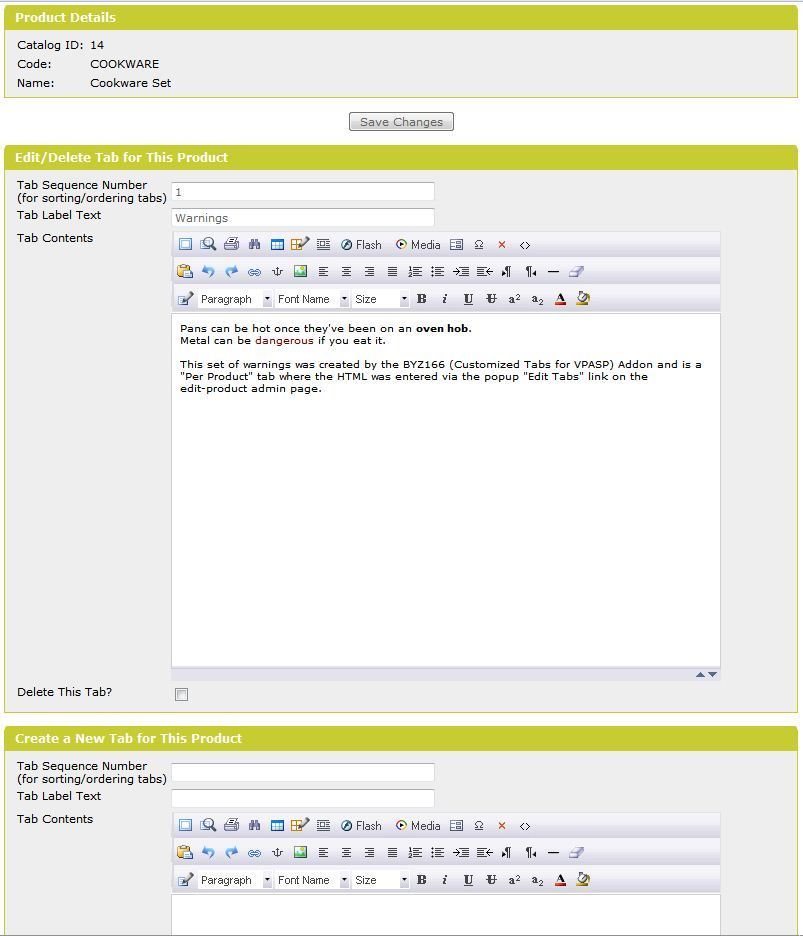
This is used, for example, if a product is a food product, and you want to create a new tab for the product for "Ingredients", where you enter all the HTML for that ingredients tab via the popup "View/Edit Tabs" link on the Edit-Product page.
When you're on the Edit-Product page in admin, press the "View/Edit Tabs" link (under the long-description field) to get the popup where you can create/edit your HTML-Based tabs.
This popup allows you to create as many tabs as you want for a given product, where you specify the label for that tab, and its sequence/ordering number, and the HTML for its contents.
When you create/edit/delete tabs from this popup screen, there is no need to alter the byz_ptb_$config.asp file or to make any changes to the byz_ptb_extra_tabs_inc.asp file.
This is the easiest way of creating new tabs on a per-product basis, as you simply need to add the label and enter the HTML in the popup screen for when you want to show a given chunk of HTML as a new tab on a given product.
By default, all the tabs that you create via the View/Edit Tabs screen will appear immediately to the right (ie after) your "Description" tab. If you want to move these HTML-Based tabs somewhere else (eg to the left of the "Description" tab) then just edit the byz_ptb_$config.asp file in notepad and move this line to the relevant part of the file:
BYZ_PTB_ADD_CONFIG_TABS_PER_PRODUCT

Per Product tabs are compatible with multiple languages, ie you can have different tab labels/content for different languages on a given product.

2. Functional Tabs
This is used, for example, if you already have relevant information in your data and you just want to display that information in a tab when relevant for a given product.
For example, you already hold the supplierid in your products record, and you want to display some details about the relevant supplier in a "Supplier" tab for your customers, but you only want that tab to appear when the product you're viewing has a supplierid stamped on it.
Another example would be if you're selling DVDs and you only want to stamp the rating on your products records (eg you want to put "18" or "15" etc in pother5) and you want to create a "Rating" tab which shows a standard block of HTML depending on the rating, without having to manually create the tab data via option 1.
i.e. This is not entered from the View/Edit Tabs screen like option 1, instead this is a more complex function-based tab, which looks at the product data of the product in question, works out what the HTML contents of the tab should be, and then outputs the tab if relevant to that product. If you want to use this "functional" type of customized-tab, then read the usage file which explain how you can create them.
If you don't want to use this "functional" type of customized-tab, and you just want to create HTML-Based tabs on a per-product basis, then you can simply use option 1 mentioned above.

All the processing to show the relevant tabs in the relevant instances is done for you behind the scenes at browse-time by this module's tab functions. We've provided several examples, and loads of notes/comments in the files to explain how to setup tabs using this module.

The addon includes simple, easy to follow installation notes, as well as more detailed "usage" notes to explain how to create customized tabs, with loads of examples.

Click here for demo (the "warnings" tab on that example page has been created via BYZ166 per-product tabs, and the "Info" tab on that example page has been created via BYZ166 as a "functional" tab; the tabs only appears for products that have relevant data in it).


For further information from the vendor about this product, please visit:


Full Version History:
VerNo Version Date Release Notes
01 26-OCT-2010 Initial version - Big Yellow Zone Customized Tabs for VP-ASP
02 12-NOV-2010 Created a new popup in admin where you can add tabs and their corresponding labels and HTML on a per-product basis, this has its own dedicated table which is created as part of the installation process.
Files effected:
README*.htm (changed files)
byz166_prepare.asp (new file; only used for installation)
byz$166_version.asp (changed file)
byz_ptb_$config.asp (changed file)
byz_ptb_fun_inc.asp (changed file)
admin/byz_ptb_edittabs.asp (new file)
admin/byz_ptb_edittabs_call_inc.asp (new file)
03 15-NOV-2010 Fixed a bug where it wasnt saving the html-descriptions on the view/edit tabs popup.
Added extra logic so that if the html-block is blank for a tab created via the view/edit tabs popup, then the tab is not shown on the product page.
Files effected:
README*.htm (changed files)
byz$166_version.asp (changed file)
byz_ptb_fun_inc.asp (changed file)
admin/byz_ptb_edittabs.asp (changed file)
04 30-MAR-2011 Enhanced to cater for multiple languages for the per-product tab data.
Upgraded BYZ038 (from V12 to V13).
Upgraded BYZ036 (from V07 to V08).
Added BYZ025 (V06)
Please Note: If upgrading from V02 or V03, please upload the byz166_addlangcol.asp file to your main (customer-side) vpasp folder before you upgrade the webfiles, and open/run it, and then delete the byz166_addlangcol.asp file from your site, but dont run/upload the byz166_prepare.asp file.
If upgrading from V01 then upload and run byz166_prepare.asp and then delete byz166_prepare.asp from your site.
If upgrading from V01, V02, or V03, make sure you install BYZ025 (V06 or later) before upgrading BYZ166.
Files effected:
README*.htm (changed files)
byz$166_version.asp (changed file)
byz166_prepare.asp (changed file; only used for initial installation)
byz166_addlangcol.asp (new file; only used when upgrading from V02 or V03)
byz_ptb_fun_inc.asp (changed file)
admin/byz_ptb_edittabs.asp (changed file)